In this post, I will show how to create a bootable USB Installer for Windows 8 (and other OS as well).
STEP 1:
Prepare at least 4GB USB Drive. Format using NTFS filesystem.
Also, make sure the partition is active as shown below:
Thursday, March 29, 2012
Wednesday, March 28, 2012
Recommended Software (updated)
It has been awhile since my last update on the Recommended Software page. I've added a couple of useful software in the list such as Waterfox, Notepad++ and Siren. Also, I've added some software based on truemax suggestion in the last post.
Visit Recommended Software Page
:: aerobrainTech ::
Monday, March 26, 2012
Windows 8: Interesting New Features
After get frustrated with the dual-boot, fortunately I have a machine to fully test Windows 8 Consumer Preview with clean install. I format the hard disk, delete all partitions and re-create using the Windows 8 Boot Installer.
Anyway, I'm not gonna talk about the installation experience (in short, it went very well except for the NVIDIA Quadro FX 1500M that is no longer supported by NVIDIA update). What I'm gonna talk about is the new interesting features in Windows 8.
Integrated Email Client and Calendar
Even without Microsoft Outlook (or similar software), Windows 8 comes with the built-in metro application. This application can be setup to access your work email (Exchange), gmail and definitely hotmail! The same goes to the Calendar!
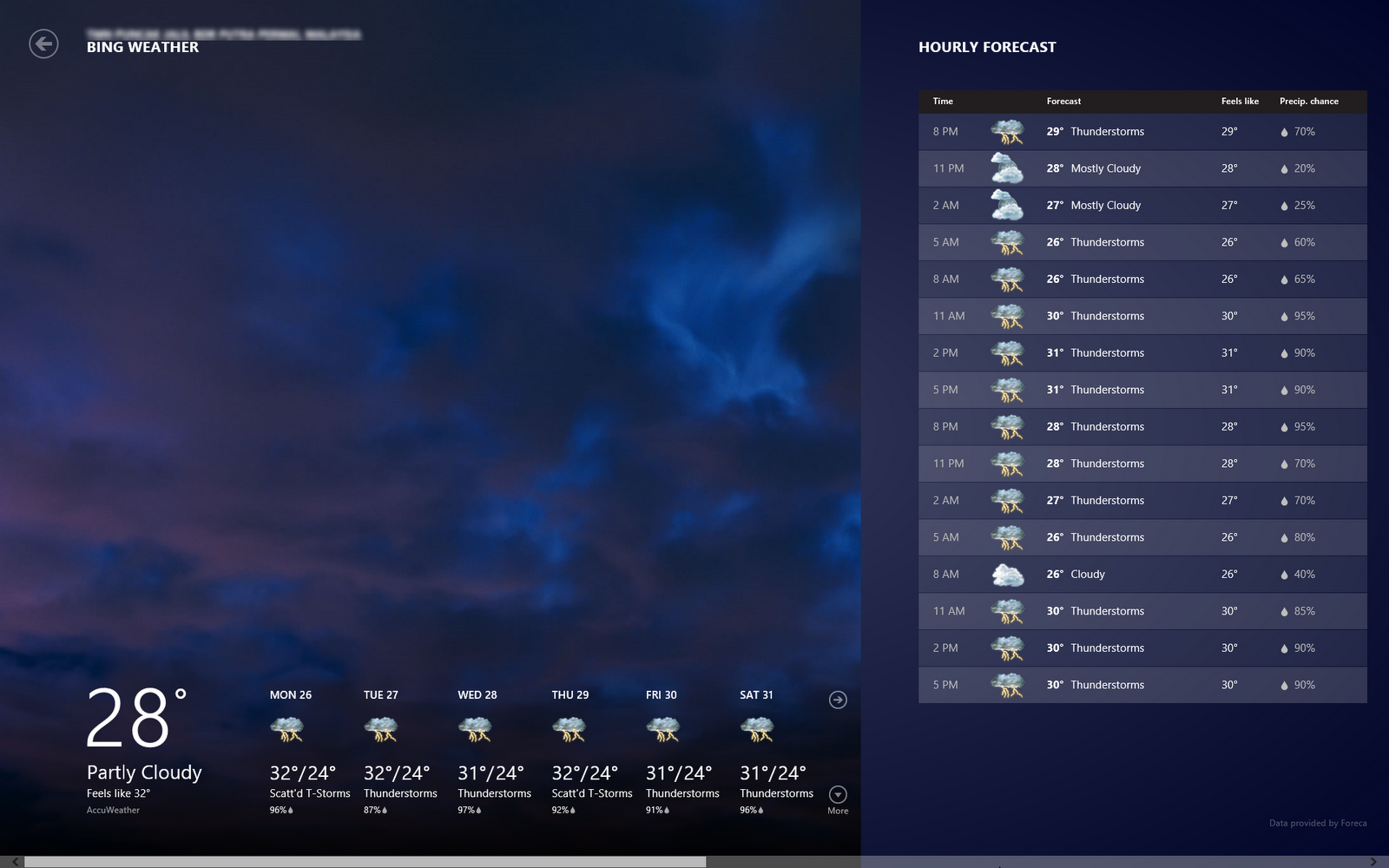
Weather
Interesting part of this weather is that once you allow the application to use your location, it will pull the current and forecast weather for your location.
Windows Store
Although there are not that many applications (yet) in the store (comparing to the Android!), but the look and feel is nice. The games also optimized to the user interface and touch experience. You can try the game 'flow'! Quite a good game to kill time.
Start Page with All the Crucial Information you need!
Interestingly, I found out that the Metro Style Start Menu or Start Page is more that just a shortcut, but it also serves as center of information. Your latest email preview will be shown here, similarly the weather and also the event on your calendar.
There are new shortcut keys introduced in Windows 8. Below are a few (if not all) that I found:
Windows Key + X
Display setting menu near the old Start Menu
Windows Key + C
Open the Right Bar
Windows Key + F
Open Find Application
Windows Key + H
Open Share List
Windows Key + K
Open Devices List
Windows Key + Q
List All Applications Installed
Windows Key + W
Open Settings
Windows Key + . (period)
View Running Applications as Right Side Bar
Click here to download the Windows 8 Consumer Preview (beta)
Happy Trying the Beta!
:: aerobrainTech ::
Monday, March 19, 2012
How to Crack RAR / ZIP?
Have you ever lost or forgotten the password for your RAR or ZIP archive? At first you don't want others to have access to your 'secret' files. But after sometimes (maybe few months or few years), you totally forgotten the password.
The good news is, RAR / ZIP archive are easily crackable. The bad news is, now you know that imposing password protection to a RAR / ZIP archive don't really secure your files! (haha!)
For a secure way to store your 'secret' files, please use TrueCrypt (free & open source)
Let us start. There are 2 free applications that you can try:
Friday, March 16, 2012
Waterfox is the 64-bit version of Firefox
If you are running a 64-bit machine with 64-bit Windows, you might want to try Waterfox. If you haven't notice, so far Mozilla only release the 32-bit version of Firefox.
Waterfox code is based on Firefox but has been recompiled to suit under 64-bit environment. This means, it should be able to support the multi-core processing and memory usage beyond 3GB. In short, it should be far better in terms of performance.
In addition to that, most of the plugins such as Flash Player, Java, etc also support 64-bit application. This shall produce a better performance browser. Why Mozilla is yet to release an official 64-bit of Firefox? I'm not sure, maybe they still want to make it better first.
If you are running 64-bit Windows, I fully recommend you to try this. It blends nicely with your Firefox current settings. So if you have addons installed, sync setup, you don't have to repeat the setting all over again. So good!
:: aerobrainTech ::
Subscribe to:
Posts (Atom)