Showing posts with label software. Show all posts

Wednesday, February 5, 2014

Uninstall Symantec Endpoint Protection without Password


  1. Run regedit as Administrator
  2. Delete smcexit key at HKEY_LOCAL_MACHINE\SOFTWARE\Symantec\Symantec Endpoint Protection\SMC
  3. Delete smcinstdata key at HKEY_LOCAL_MACHINE\SOFTWARE\Symantec\Symantec Endpoint Protection\SMC
  4. Run "smc -stop" at command prompt (run as Administrator)
  5. Uninstall Symantec Endpoint Protection using Program and Features (in Control Panel) 

Good Luck!

:: aerobrainTech ::

Wednesday, October 24, 2012

Free Android Source Code for Battery Status/Widget


I'm distributing my Source Code for the Battery Status and Battery Widget that I have shared in the previous posts. You may visit Android Apps page to grab the Source Code. I'm releasing these Source Codes as below license:

Creative Commons License

I'll let you try to combine these separate codes to work as an application containing that can launch and also can work as widget. I'll be posting the full combined Source Code maybe after couple of days. In fact I'm running the combined code on my phone right now. Work like a charm!

If anybody manage to combine, feel free to comment below.

Happy Coding Android!

Previous Related Posts:
Android Sample Code: Battery Status
Android Sample Code: Battery Widget  

:: aerobrainTech ::

Wednesday, October 10, 2012

Firefox 16


Mozilla has released Firefox 16 today! Try it now!

Anyway, I'm still waiting for the Waterfox team to compile the 64-bit version of Firefox. [can't wait!]

:: aerobrainTech ::

Thursday, April 26, 2012

Google Drive vs Microsoft SkyDrive vs Dropbox


Just 2 days after Microsoft announced the SkyDrive, Google rise with the new Google Drive.

Below are couple of pictures during the installation:


Here is my comparison:


Free Storage
5GB
7GB
(25GB for existing user!)
2GB
Maximum File Size
10GB
2GB
Unlimited (desktop)
300MB (online)
Sync Immediately upon File Change
YES
YES
YES
Notification upon File Change
NO
NO
YES
Sync over LAN
NO
NO
YES
Speed Notification during Sync
NO
NO
YES

:: aerobrainTech ::

Tuesday, April 24, 2012

SkyDrive: Free 25GB, Sync Like Dropbox

Yesterday, the official Windows 8 Blog announced that SkyDrive now can be synchronized to your desktop thru a client application. The good news is that for the existing Windows Live account, you will get FREE upgrade from 7GB to 25GB!

Scroll down below to see my comparison the SkyDrive vs Dropbox.

Below are my screenshot during the installation of SkyDrive client application on Windows 7.


 Here is my comparison:


Free Storage

7GB
(25GB for existing user!)
2GB
Maximum File Size
2GB
Unlimited (desktop)
300MB (online)
Sync Immediately upon File Change
YES
YES
Notification upon File Change
NO
YES
Sync over LAN

NO
YES
Speed Notification during Sync
NO
YES

SkyDrive won on the storage size but lack of minor things compared to Dropbox. Hopefully SkyDrive team can continuously improve this cool service!

Source: Making personal cloud storage for Windows available anywhere, with the new SkyDrive

:: aerobrainTech ::

Thursday, March 29, 2012

Creating Bootable USB Installer for Windows 8

In this post, I will show how to create a bootable USB Installer for Windows 8 (and other OS as well).

STEP 1:
Prepare at least 4GB USB Drive. Format using NTFS filesystem.
Also, make sure the partition is active as shown below:
 

Wednesday, March 28, 2012

Recommended Software (updated)

It has been awhile since my last update on the Recommended Software page. I've added a couple of useful software in the list such as Waterfox, Notepad++ and Siren. Also, I've added some software based on truemax suggestion in the last post.

Visit Recommended Software Page

:: aerobrainTech ::

Monday, March 26, 2012

Windows 8: Interesting New Features


After get frustrated with the dual-boot, fortunately I have a machine to fully test Windows 8 Consumer Preview with clean install. I format the hard disk, delete all partitions and re-create using the Windows 8 Boot Installer.

Anyway, I'm not gonna talk about the installation experience (in short, it went very well except for the NVIDIA Quadro FX 1500M that is no longer supported by NVIDIA update). What I'm gonna talk about is the new interesting features in Windows 8.

Integrated Email Client and Calendar
Even without Microsoft Outlook (or similar software), Windows 8 comes with the built-in metro application. This application can be setup to access your work email (Exchange), gmail and definitely hotmail! The same goes to the Calendar!

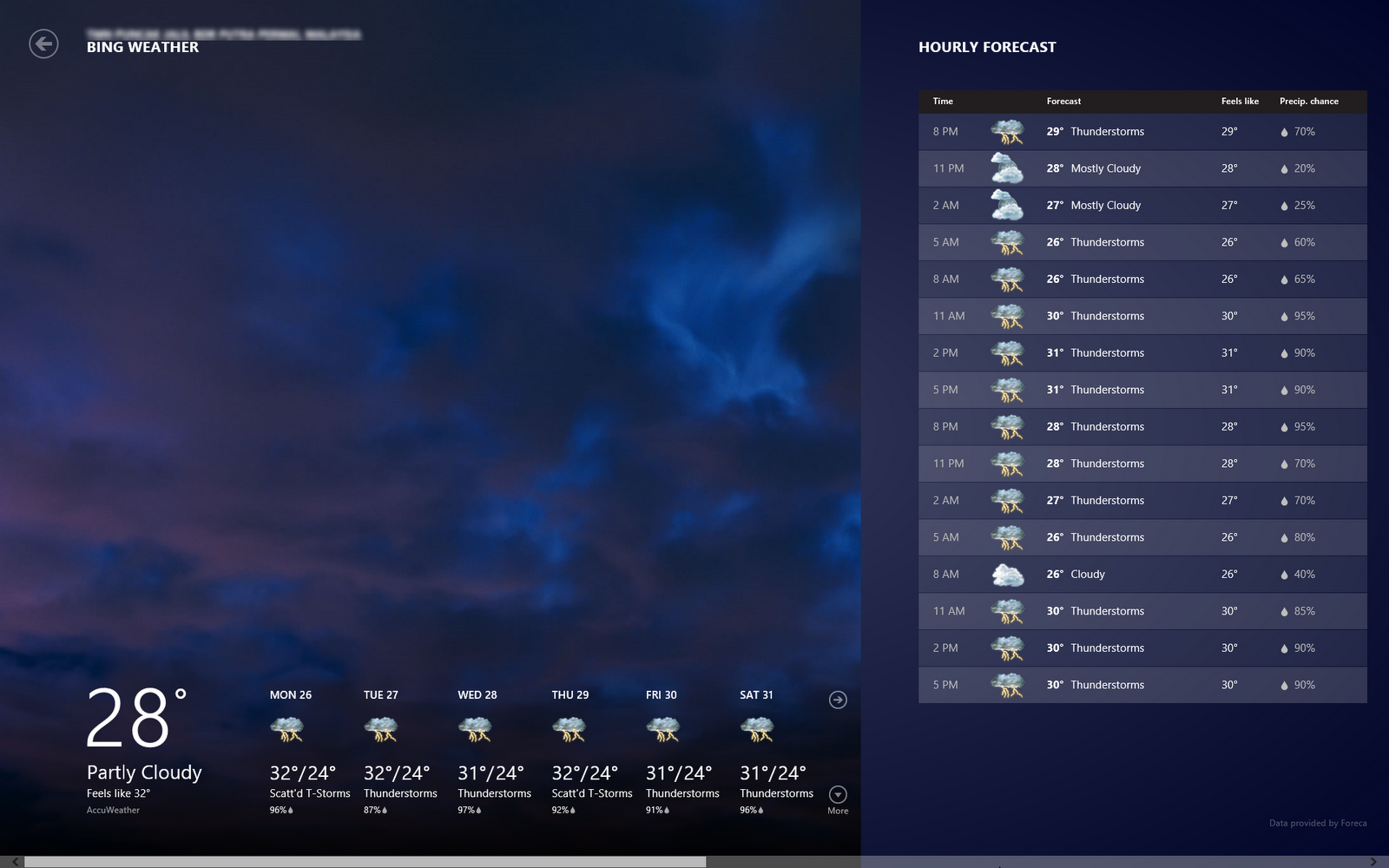
Weather
Interesting part of this weather is that once you allow the application to use your location, it will pull the current and forecast weather for your location.

Windows Store
Although there are not that many applications (yet) in the store (comparing to the Android!), but the look and feel is nice. The games also optimized to the user interface and touch experience. You can try the game 'flow'! Quite a good game to kill time.


Start Page with All the Crucial Information you need!
Interestingly, I found out that the Metro Style Start Menu or Start Page is more that just a shortcut, but it also serves as center of information. Your latest email preview will be shown here, similarly the weather and also the event on your calendar.

New Shortcut Keys
There are new shortcut keys introduced in Windows 8. Below are a few (if not all) that I found:
Windows Key + X
Display setting menu near the old Start Menu

Windows Key + C
Open the Right Bar

Windows Key + F
Open Find Application

Windows Key + H
Open Share List

Windows Key + K
Open Devices List

Windows Key + Q
List All Applications Installed

Windows Key + W
Open Settings

Windows Key + . (period)
View Running Applications as Right Side Bar

Click here to download the Windows 8 Consumer Preview (beta)
Happy Trying the Beta!

:: aerobrainTech ::

Monday, March 19, 2012

How to Crack RAR / ZIP?

Have you ever lost or forgotten the password for your RAR or ZIP archive? At first you don't want others to have access to your 'secret' files. But after sometimes (maybe few months or few years), you totally forgotten the password.

The good news is, RAR / ZIP archive are easily crackable. The bad news is, now you know that imposing password protection to a RAR / ZIP archive don't really secure your files! (haha!)

For a secure way to store your 'secret' files, please use TrueCrypt (free & open source)

Let us start. There are 2 free applications that you can try:

Friday, March 16, 2012

Waterfox is the 64-bit version of Firefox


If you are running a 64-bit machine with 64-bit Windows, you might want to try Waterfox. If you haven't notice, so far Mozilla only release the 32-bit version of Firefox.

Waterfox code is based on Firefox but has been recompiled to suit under 64-bit environment. This means, it should be able to support the multi-core processing and memory usage beyond 3GB. In short, it should be far better in terms of performance.

In addition to that, most of the plugins such as Flash Player, Java, etc also support 64-bit application. This shall produce a better performance browser. Why Mozilla is yet to release an official 64-bit of Firefox? I'm not sure, maybe they still want to make it better first.

If you are running 64-bit Windows, I fully recommend you to try this. It blends nicely with your Firefox current settings. So if you have addons installed, sync setup, you don't have to repeat the setting all over again. So good!


:: aerobrainTech ::

Wednesday, March 14, 2012

Firefox is Now 11!


The title maybe confusing .. but it's true!! Firefox 11 has been available for download at the link below:


:: aerobrainTech ::

Sunday, March 4, 2012

Painful Experience: Windows 8 CP Dual-Boot


Today is the 3rd day I'm trying to install Windows 8 Consumer Preview as a dual-boot with my Windows 7. The dual-boot seems success but Windows 8 still cannot start properly today. Last night it was running properly and it was shut down properly. But today, it does not start properly again. After selecting Windows 8 on the boot menu, what does appear was just blue screen and a cursor. I think I've tried to install more than 10 times.

Before I continue to the list of issues I encountered during the installation, below are the specifications:
  • Machine: DELL Latitude E6420
  • Processor: Intel Core i7
  • RAM: 4GB
  • Current OS: Windows 7 Professional 32-bit
  • Intent to Install: Windows 8 Consumer Preview 64-bit
List of useful tools involved:
Windows Storage Management: Run > diskmgmt.msc
EASEUS Partition Master: Download here

Below are the list of issues:

Thursday, March 1, 2012

Windows 8 Consumer Preview is here!


Windows Consumer Preview is available for download now!! You may visit the below link to download the ISO image file. It is available for 32-bit as well as 64-bit machines. The size of the ISO files are 3.3GB for 64-bit and 2.5GB for 32-bit. It is also available in 5 different languages, English, Chinese, French, German and Japanese.

Download Windows Consumer Preview

The most exciting part is when Microsoft redefines the concept of mouse and keyboard and optimize the windows for touch. It is easier and friendlier to access commands and running apps instead of on the traditional taskbar (introduced since Windows 95). For me, it is really worth to try for normal users and for the application developers. This could be the next trend!


:: aerobrainTech ::

Wednesday, February 8, 2012

Truecrypt 7.1a

TrueCrypt has released new version 7.1a. Starting version 7.1, TrueCrypt now supports Mac OS X 10.7 Lion. As I mentioned before in my previous post, TrueCrypt is the best open source encryption software.

You may visit TrueCrypt.org to download.

:: aerobrainTech ::

Saturday, February 4, 2012

Android App Development

Recently I got an Android Phone so I think why not I try to develop Android Apps. Right now I managed to run simple app to display battery level and voltage. I'll be posting more soon on this.

Stay Tuned.

:: aerobrainTech ::

Thursday, February 2, 2012

Firefox 10 is here!

Now Firefox 10 is available! Let us support this free browser!


:: aerobrainTech ::

Friday, December 23, 2011

Firefox 9.0.1

The latest Firefox has been released. It was Firefox 9 before a day later they released a minor update of Firefox 9.0.1.

Anyway these are the 10 reasons why you should upgrade to this new version:
  1. It's free!
  2. It's easier than you might think.
  3. It's fast.
  4. It's more stable.
  5. It's more secure.
  6. You can keep all your bookmarks.
  7. Improved memory usage. (up to 50% improvement!)
  8. It's easy to search with Firefox.
  9. You'll join 100 MILLION people on the most modern version of Firefox.
  10. You'll be supporting the Mozilla mission.
For more detailed explanation you may visit blog.mozilla.com

You may get the download link from mozilla.com

:: aerobrainTech ::

Monday, July 11, 2011

Firefox 6 Beta

Just after 2 weeks Mozilla launched Firefox 5, now Firefox 6 Beta has already been pushed out to users who sign up for Beta programs (me one of them!) .. So far, I did not notice anything major yet on this Beta version. Below are the official statement from Mozilla Release Notes:

What’s New in Firefox Beta

The latest version of Firefox Beta has the following changes:
  • The address bar now highlights the domain of the website you're visiting
  • Streamlined the look of the site identity block
  • Added support for the latest draft version of WebSockets with a prefixed API
  • Added support for EventSource / server-sent events
  • Added support for window.matchMedia
  • Added Scratchpad, an interactive JavaScript prototyping environment
  • Added a new Web Developer menu item and moved development-related items into it
  • Improved usability of the Web Console
  • Improved the discoverability of Firefox Sync
  • Reduced browser startup time when using Panorama

Stay tuned for more updates!

:: aerobrainTech ::

Wednesday, April 13, 2011

TrueCrypt: on the fly encryption


Nowadays, we can carry lots of information with us especially when digital storage device capacity has increased exponentially over the past few years. I remember buying my very first USB drive which capacity only 16MB (year 2001), at the same cost right now (year 2011) I could buy 250GB portable hard drive. With that amount of capacity you have, you could store lots of data be it photos, videos, documents, etc. Some are casual, sharable, some are confidential.

We would like to focus on the confidential data. Do you ever worried the confidential data in your storage devices fall into wrong hands and manipulate your data for their interest. Thus, here I would like to introduce a powerful encryption software but yet very easy to use.

Over the past years, I've tried a few encryption software (free ones). Of course, a famous one until today is GPG or GNU Privacy Guard. Although the encryption is great, out of the question, but the user interface really need improvement (you need programming basic).

TrueCrypt Concept
TrueCrypt is an open source software that allows you to encrypt file on the fly. You can either create an encrypted volume inside your storage device or you can even encrypt the whole partition/drive. The concept of creating an encrypted volume is like you have a drive inside a drive. Let say your USB drive capacity is 4GB, you may create an encrypted volume of 1GB. All you have to do is just to mount the 1GB volume as another drive whenever you want to access read/write/edit the file in the volume.
*Tips: TrueCrypt can run on its own (standalone mode). You can choose the standalone mode by selecting Extract instead of Install during installation. You can copy the executable file (~1.5MB) into your USB drive so that you can carry around together with the encrypted volume.

TrueCrypt Encryption Algorithm
TrueCrypt uses famous encryption algorithm and also able to combine them. During the volume/partition/drive encryption, you can run the benchmark test to see the speed of encryption and decryption for the different algorithm. Below are snapshot on my PC (different PC may have different speed due to vary in specifications):

TrueCrypt and Dropbox (File Sharing)
This encrypted volume, not only great for storing in local devices but also good to store over the Internet such as Dropbox. Although Dropbox already guaranteed AES encryption, but it is unlocked by using your user name and password which can be reset by admin. Thus, I would strongly recommend you encrypt your highly confidential files before placing over the Internet. Remember when you feel convenient that you can access your files from anywhere, anytime, others may do the same to your file.
*Tips: Keep the encrypted volume small just nice to fit all your confidential files (document, photo, etc). The smaller the file, the faster it sync through Internet. FYI, my encrypted volume is just 2 to 5MB and it sync seamlessly all the time.

Reminder
Due to its high security, the password cannot be reset or retrieved if you have forgotten the password. Thus, always use password that difficult to guess but easier to remember by you only. Alternatively, TrueCrypt allows you to use other files (any format) to use as a keyfile. But then, you must make sure you don't loose or corrupt the file, otherwise you can't open your encrypted volume.

Compatibility
I tested with Windows XP, Windows 7 Ultimate 32-Bit and 64-Bit without any issue.


Download TrueCrypt
Visit TrueCrypt Official Website to download and also read more details on this software. I would recommend this software for your to ensure your confidential data is secured at least when you are looking.

:: aerobrainTech ::

Saturday, March 26, 2011

Firefox 4.0 Alternative Download Link


Firefox 4.0 Final Release is out! So far the download stats as shown above. Its about 2000-3000 downloads per minute. Here is the alternative download link if you are having difficulties/slow with the main download server: Firefox 4 Alternative Download link.

:: aerobrainTech ::